Background Practise, Animata, Max Msp, Kinect from Eva Daly on Vimeo.
Showing posts with label Prototype. Show all posts
Showing posts with label Prototype. Show all posts
Sunday, 4 August 2013
Practice Background Positioning
Today I did a quick practice patch for the background elements of my Interactive Installation. The swinging heart, mushrooms and small moths move independently but the large moth follows your head with the kinect so it will appear as if it is following you. Tomorrow I will all the other characters i have illustrated which you ill be able to animate and interact with using the kinect!

Wednesday, 24 July 2013
Practise!
Here is a pactise patch I've been working on. The quality is quite poor, I've been finding the software animata very buggy and have had to do alot of redesign in regards to illustrations.
I am working with a kinect which sends osc messages to Max Msp which then sends messages to animata. Max can only take readings up to 999 and these numbers relate to your position on the x or y axis in Animata, I took quite some time to figure out that the numbers were being sent the pixels in the images used in Animata, I'd been working with quite large images up to 3000 x 3000 which only a third of the image in Animata was being utilised and the images became shortened and deformed.
Anywhoo! I resolved some of these issues and came up with this patch to practise with. The images, sound, animation aren't great but I intend to improve upon this drastically over the next couple of weeks!
Animata, Max, Msp, Kinect. from Eva Daly on Vimeo.
Anywhoo! I resolved some of these issues and came up with this patch to practise with. The images, sound, animation aren't great but I intend to improve upon this drastically over the next couple of weeks!
Saturday, 18 May 2013
Prototype - Animata
Here are some of my attempts using animata, they are not the most elegant animations, but I'm just trying to feel out the software for now!
First attempt, trying to animate a panda arm.
Animating a panda arm using the software animata. from Eva Daly on Vimeo.
Second attempt, "Never Alone"
Spider leg, animata from Eva Daly on Vimeo.
First attempt, trying to animate a panda arm.
Animating a panda arm using the software animata. from Eva Daly on Vimeo.
Second attempt, "Never Alone"
Spider leg, animata from Eva Daly on Vimeo.
Friday, 17 May 2013
Prototype - Low Fidelity - Sketches /Storyboard
For my final project I decided I would create an art installation where the viewer would animate and manipulate the movements of characters on a projected surface with a kinect. After deciding upon the concept and technologies I will use (Animata and Max Msp) I needed to think about the project more in depth.
What characters will I use?
How will they move?
How will I incorporate sound?



I made sketches of four different scenarios.
1 "Oh deer what can the matter be."

Characters
Girls head, dears coming out of it, resembling a plaque.
Movements
Using a kinect, when you move your head from right to left the girls head will do the same. When you lift your arms you will be able to control the deer heads. The deers will turn towards and away from each other.
Sound
I want the girl to be humming a childrens song of key, to create an eerie atmosphere. I want the deers to be able to talk to each other, when one head is turned to the other it will speak, when both the heads are turned to each other they both speak. However the dears will be speakng backwards for an extra sinister feel.
2 "Never alone"

Characters
Innocent deer creature, with a spider alien bursting out of it's chest.
Movements
The user will be able to move the head of the deer with there own. The spider leg will be controlled by the users arm. The joints of the spider leg will be the same as a human arm.
Sound
When the joints of the spider leg move it will make creeking noises like an old door hinge in a haunted house.
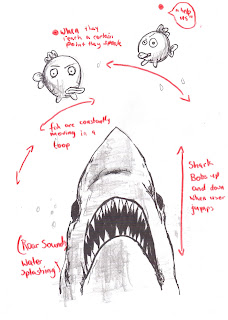
3 " Fizzy lil fish"
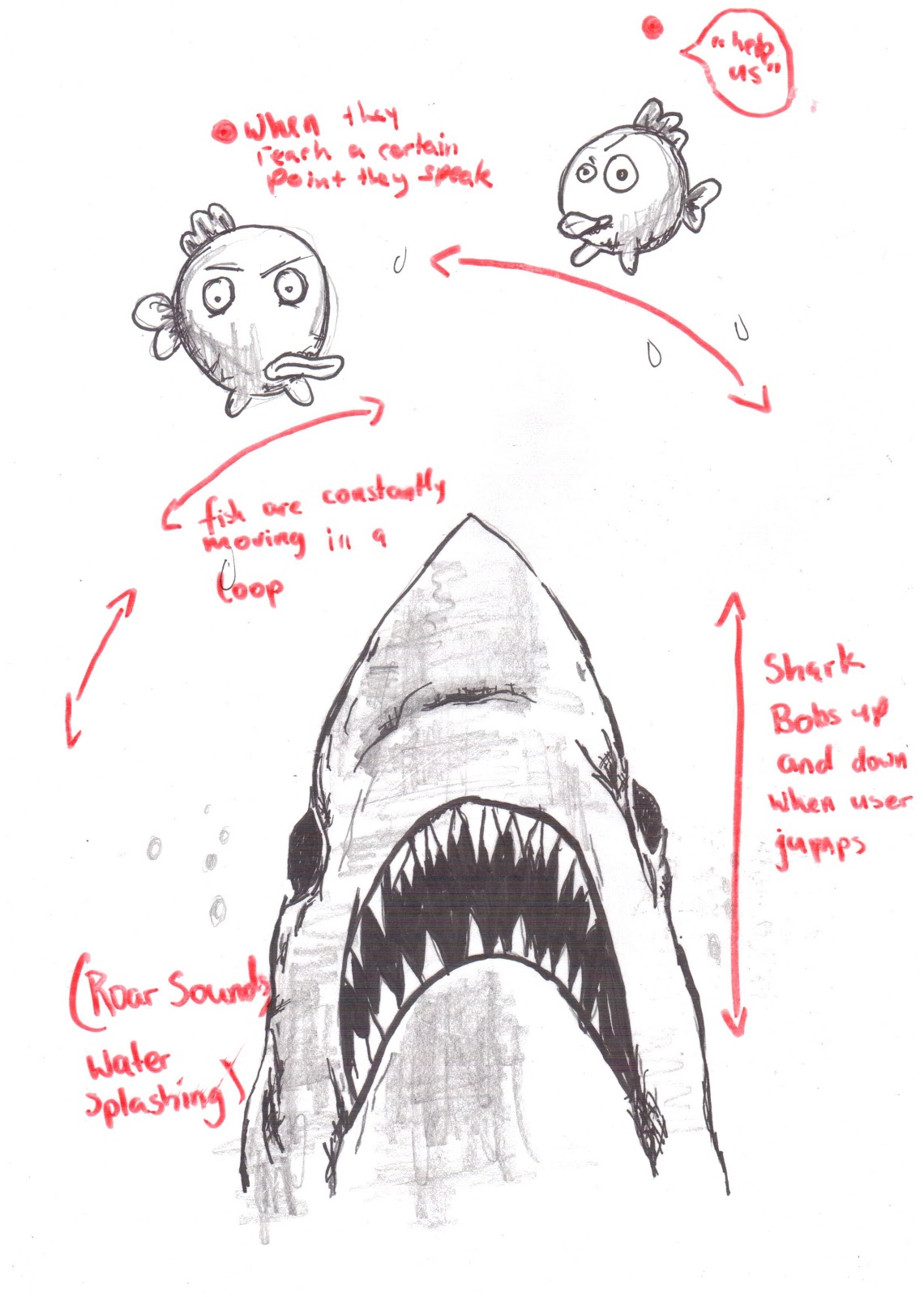
Characters
Hungry shark and disgruntled fish.
Movements
The fish would be on a continuos loop flying though the air. The user would be able to control the shark by jumping up and down, so it would appear the shark is bobbing up and down trying to catch the fish.
Sound
Constant sounds of water/the sea and splashing noises when the shark moves up and down.
4 "When a panda meets a skull"
(the name is terrible, can't think of anything better right now, so that'll have to do!)

Characters
Walking panda and a talking skull. The idea is; when the panda gets close to the skull it will start to talk.
Movements
The user will be able to manipulate the pandas movements with their own body, head, arms and legs making him walk/shuffle from side to side.
Sound
The panda will make big stomping sounds when it walks. When it gets close enough to the skull it will start to talk. I'm not sure what the skull is gong to say yet or how its going to sound but it won't be very pleasant!
Wednesday, 15 May 2013
PANDA DANCE!! Processing and Pure Data
PANDA DANCE! from Eva Daly on Vimeo.
I created my visuals through Processing. I scaled the data between 1-0 which ment if I wanted the colour of the ellipses to change, It would be multiplied 255. Processing then recieved messages from pure data.
I drew ellipses into processing that would change position, with different frequency that were being sent from pure data. I also assigned different coloured backgrounds to the different frequency. I then imported images I had drawn, scanned, then photoshoped. Different images would also appear at different frequency to make it appear as if the panda was dancing in time with the music.
Pure Data


Above are the different frequencies being sent form Pure Data to Processing.

Music Loaded in Pure Data "Put on your dancing shoes" by Arctic Monkeys.
Here is the code for Processing.
Tuesday, 16 April 2013
First attempt at Animata!
I'm one step closer to making angry pandas come to life! I started by uploading a drawing of a panda arm and with the help of a tutorial available on the Animata website, I was able to animate it! I started by creating a skeleton around the arm, then creating joints were I wanted the arm to move, e.g. wrist, elbow then created a fixed joint in the shoulder. I then made vertices where the wrist, elbow, shoulder met, this is basically creation a circle around the hand, forearm and upper arm, the circle/vertex indicates how that part of the arm is capable of rotating. After this you could them simple guide the arm to where you wanted it to move. To finally make the arm move you simply increase the tempo and the arm moves automatically. You can also control the stiffness of the movement and how much the joint moves. My next step is to incorporate what I've done with the camera on my laptop or a Kinect, so I can manipulate the movement with my own arm.


Thursday, 11 April 2013
Animata
A software I hope to use for my final project is animata. It is an open source real-time animiation software designed to create animations, interactive background projections for concerts, theatre and dance productions. Here is an example of the possibilities with this software.
Reverse Shadow Theatre from gabor papp on Vimeo.
Reverse Shadow Theatre from gabor papp on Vimeo.
Subscribe to:
Posts (Atom)